Fence Post Concrete Calculator
Work out how much concrete your fence-post holes need — and how many bags to buy — accounting for post displacement and a gravel base.

By Berjin B V
Published Updated
- Calculated posts
- —
- Concrete depth (per hole)
- —
- Hole volume (per hole)
- —
- Post displacement (per hole)
- —
- Net concrete (per hole)
- —
- Total concrete
- —
- Equivalent bags
- —
- Approx. bags per hole
- —
- Recommended purchase
- —
- Total bag weight
- —
Request a Free Fencing Quote
Tell us about your fencing project and location. We'll prepare a quote and send it to you when it's ready — Buildmator prepares these manually, and there's no obligation.
Request a Free Fencing QuoteNot a structural specification
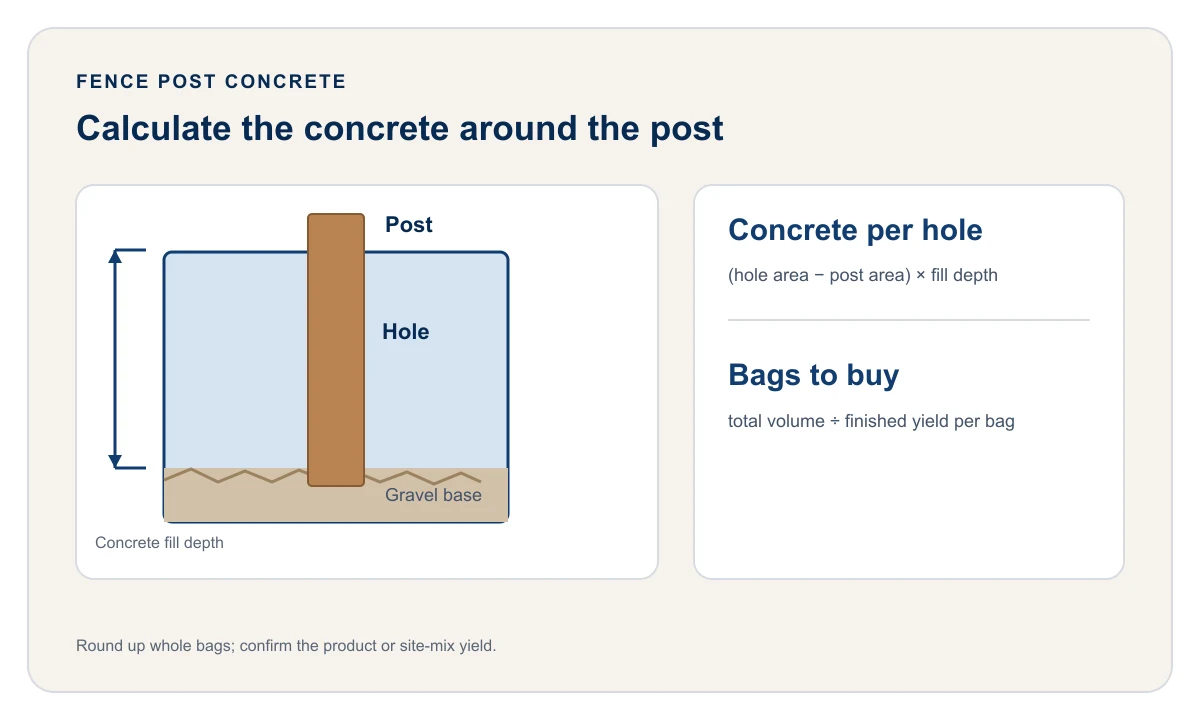
Work out exactly how much PCC your fence-post or compound-wall footings need — as a precise volume in litres, and (where you enter a yield) a bag or batch count that won’t leave you short. This is a material quantity calculator: it doesn’t price concrete, size your pits, or check structural adequacy.
How to use this calculator
- Measurement units — metres / millimetres (default) or feet / inches. Switch any time; your numbers convert automatically.
- Post count — enter it directly, or choose Calculate from fence length and spacing and give the boundary length and target spacing; the count updates live.
- Pit shape and size — round (diameter) or square (width), the total pit depth, and an optional gravel base depth.
- Post shape and size — round (diameter) or square (width). The tool checks the post fits the pit, including the diagonal of a square post in a round pit.
- Bag size — defaults to a 50 kg cement bag; the yield is the concrete one bag makes in a nominal 1:2:4 (≈M15) mix, about 5.5 ft³ (156 L). Pick a smaller bag or a leaner/richer mix and the yield stays editable.
Press Calculate for the full breakdown.
The formula
For each footing, PCC needed is the pit volume minus the buried post’s volume minus any gravel base:
- Apit
- cross-sectional area of the pit
- Apost
- cross-sectional area of the buried post
- dfill
- depth actually filled with concrete
- dpit
- total pit depth
- dgravel
- gravel base depth (0 if none)
The whole run:
If you enter a yield, the exact count is Vtotal ÷ Y, and the number to prepare is that rounded up (project mixing) or each footing rounded up then multiplied (separate pours).
Boundary length to post count
Rounding up keeps the last bay no wider than your target spacing (often 3 m for compound walls); the + 1 puts a post at each end.
Worked example — MS angle post
A 30 m compound-wall run, posts every 3 m, so 11 posts. Pits are 300 mm diameter, 450 mm deep, no gravel; posts are 50 mm square (MS angle):
| Step | Value |
|---|---|
Posts: ceil(30 / 3) + 1 |
11 |
| Fill depth | 450 mm = 0.45 m |
Pit area: π × (0.15)² |
0.0707 m² |
Post area: (0.05)² |
0.0025 m² |
PCC per pit: (0.0707 − 0.0025) × 0.45 |
≈ 0.031 m³ = 31 L |
Run total: 31 × 11 |
≈ 337 L of PCC |
To turn this into a count: with a nominal 1:2:4 mix, ~337 litres of wet PCC needs roughly 0.52 m³ of combined dry material. Enter your batch’s finished-concrete volume as the custom yield to get a batch count.
Worked example — bulky precast RCC post
Same run and pits, but 100 mm square precast RCC posts:
| Step | Value |
|---|---|
Post area: (0.1)² |
0.01 m² |
PCC per pit: (0.0707 − 0.01) × 0.45 |
≈ 0.0273 m³ = 27.3 L |
Run total: 27.3 × 11 |
≈ 300 L |
The bulkier post displaces more, so the same pits need about 11% less concrete.
Turning a nominal mix ratio into a yield
UltraTech Cement’s guide to nominal M15 concrete, checked September 1, 2026, describes the 1:2:4 cement, sand, and aggregate starting mix. The finished yield below is a planning approximation; measure your own batch yield before turning volume into a bag count.
| Nominal mix | Typical use | Approx. finished concrete per unit of dry material |
|---|---|---|
| 1:2:4 | Standard PCC for footings | ~0.65 |
| 1:3:6 | Mass/lean PCC | ~0.62 |
| 1:4:8 | Blinding / very lean | ~0.60 |
So for a 1:2:4 batch, about 1.5 volumes of combined dry cement + sand + aggregate produce 1 volume of concrete.
Typical pit and post dimensions
Common starting points, not a structural specification — wall height, wind exposure, soil, and post type all matter.
| Post | Post size | Pit diameter | Pit depth |
|---|---|---|---|
| MS angle, low fence | 40–50 mm | 250 mm | 450 mm |
| MS angle / GI, boundary | 50–65 mm | 300 mm | 450–600 mm |
| Precast RCC, compound wall | 100–125 mm | 300–350 mm | 500–600 mm |
| Tall / exposed | 125 mm+ | 350–450 mm | 600 mm+ |
Unit conversions used
Why subtract the post
PCC only fills the gap around the post, not the whole pit. Ignoring the post’s own volume overstates the concrete — for a slim MS angle it’s a few percent, but for a bulky RCC or precast post it can be 10–20%.
Common mistakes this calculator avoids
- Pricing the full pit volume instead of the concrete around the post.
- Using a bag weight as a yield when the concrete is site-batched — yield comes from the mix ratio.
- Rounding a fractional batch count down.
- Forgetting the end posts —
posts = spans + 1.
Worked planning scenario
For 18 precast RCC posts in 300 mm square pits 600 mm deep, the post dimensions materially affect the PCC volume. A 100 mm square post displaces 6 L per pit, or 108 L across the run, compared with calculating the pits as empty. Enter the actual post width and use the result as the required finished-concrete volume. If concrete is batched on site, enter the finished yield of the batch you will make; the calculator does not design the mix or provide a cement, sand, and aggregate schedule.
Methodology
Material quantity only — the geometric volume of PCC implied by your dimensions, as an exact figure and (with a yield) a purchase or batch count rounded up so rounding can’t leave you short. It does not determine safe embedment, soil bearing, or structural adequacy; pit depth and post design are decisions for you or your contractor to confirm locally. Choose your pit dimensions first, then use this calculator for materials.
Want the background rather than a specific calculation? Read our guide to how much concrete a fence post needs — the geometry, a bag-yield table, and worked examples for 1, 10, and 20 posts.
FAQs
Is this the same as a post hole concrete calculator?
Yes — post hole concrete calculator and fence post concrete calculator both describe sizing a post footing's PCC (plain cement concrete) volume, whether you're setting a precast RCC post, an MS angle post, or a timber one.
Do I need pre-mixed bags, or can I batch my own cement, sand and aggregate?
Either works. The default 50 kg cement bag estimates how much wet concrete that cement makes in a nominal 1:2:4 (M15) site mix; it is not a premixed-concrete bag. For another site mix, enter the finished volume one batch or cement bag produces as a custom yield. For packaged premixed concrete, use the finished yield printed on that product.
How much concrete does one fence post footing need?
For a 300 mm diameter, 450 mm deep pit around a slim 50 mm MS angle post, about 31 litres of PCC. A bulkier precast RCC post displaces more, so it needs less concrete in the same pit. The calculator gives the exact figure once you enter your pit and post dimensions.
How do I convert a mix ratio to a yield figure?
For a nominal 1:2:4 mix, roughly 1.5 to 1.55 units of dry material make 1 unit of wet concrete — so about 0.65 m³ of finished concrete per m³ of combined dry cement, sand and aggregate. Enter the volume of finished PCC one of your batches produces as the custom yield.
Do fence posts in India need a gravel base?
Not usually — many installations pour PCC directly onto compacted or levelled soil. The calculator supports a gravel base as an optional field; set it to 0 if your installation doesn't use one.